TradeCalc Position Size Calc
TradeCalc: the position size calculator app for iPhone, for forex, futures, crypto and stocks
Position sizing and trading tools, right on your iPhone

Before every trade you need the same answer: how big should the position be so that a stop loss costs you only the amount you decided to risk? Doing it by hand or in a spreadsheet is slow, and pip and tick values differ from one market to the next.
TradeCalc takes your balance, your risk and your stop loss and gives you the position size straight away, with the potential profit and loss. Margin, pip value, drawdown, risk/reward, pivot points and Fibonacci levels are in the same app. It is a calculator: no account to create, and calculations work without internet.
How it works
- 1
Enter your risk
Type your account balance, the risk you accept (a percentage or a fixed amount) and your stop loss, in pips, ticks or price levels.
- 2
Pick your market
Forex pairs with an automatic pip value, futures with their tick values, crypto and stocks. The calculator adapts to the instrument.
- 3
Read the result
Your position size appears as you type, together with your potential profit and loss. Then check margin, drawdown or the risk/reward ratio with the other tools.
Features
Position size in seconds
Balance, risk percentage (or fixed amount) and stop loss in, position size out. It works with pips, ticks or price levels, and every input updates the result in real time.
Forex, futures, crypto and stocks
All major, minor and exotic forex pairs with automatic pip value, futures such as ES, NQ, YM, CL, GC, MES and MNQ with tick values, BTC, ETH, SOL and other cryptocurrencies, and any stock.
7 trading tools in one app
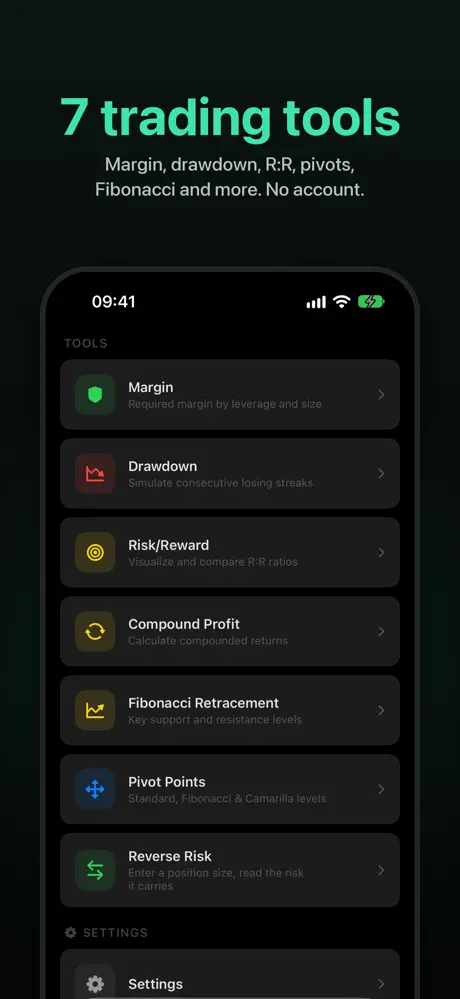
Position size, margin, profit, pip value, drawdown (simulate consecutive losses), risk/reward with visual bars, pivot points (Standard, Fibonacci, Camarilla) and Fibonacci retracement.
Market sessions clock
Live indicators for the Sydney, Tokyo, London and New York sessions, with overlap detection, so you know which market is open.
Offline, no account
No internet needed for calculations (exchange rates are cached) and no account to create. Your calculations and profiles stay on your device. Dark mode included.
Profiles, favorites and widget
Save account profiles and favorites to start from your usual setup. Pro makes both unlimited and adds an iOS home screen widget.
Free or Pro
Free
- The position size calculator and the other trading tools: margin, profit, pip value, drawdown, risk/reward, pivot points, Fibonacci
- Forex, futures, crypto and stocks
- Market sessions clock
- Includes ads
Pro
- No ads
- Unlimited favorites
- Unlimited account profiles
- iOS home screen widget
TradeCalc Pro is a one-time in-app purchase: no subscription, you keep it. The App Store shows its price in your currency.
Compared with what you use today
- A web calculator
- Fine for a one-off figure, but you work in a browser and enter your details again each time. TradeCalc is an app, works without internet for calculations and keeps your account profiles and favorites on your device.
- A spreadsheet
- Flexible, but you build and maintain the formulas and look up the pip or tick value of each instrument yourself. TradeCalc applies the pip value for forex pairs and the tick values for futures for you.
- Your broker platform's calculator
- Handy for that broker's instruments, but it belongs to that platform. TradeCalc is independent: no account, and forex, futures, crypto and stocks in the same app.
Gallery



Frequently Asked Questions
How do I calculate position size?
Decide how much of your balance you risk on the trade, then divide that amount by the cost of your stop loss per unit (pip, tick or price move). In TradeCalc you enter the balance, the risk as a percentage or a fixed amount, and the stop loss, and it returns the position size straight away.
Is there a position size calculator app for forex, futures and crypto?
Yes. TradeCalc covers forex (major, minor and exotic pairs, with automatic pip value), futures such as ES, NQ, YM, CL, GC, MES and MNQ (with tick values), cryptocurrencies such as BTC, ETH and SOL, and stocks. It is an iPhone app.
Is there a position size calculator without a subscription?
Yes. TradeCalc is free to use, with ads. Pro is a one-time in-app purchase that removes the ads, makes favorites and account profiles unlimited and adds a home screen widget. There is no subscription, and the App Store shows the price in your currency.
Does TradeCalc work offline?
Yes. Calculations need no internet connection. Exchange rates are cached, so conversions still work with the last rates the app downloaded.
Does TradeCalc place trades or connect to my broker?
TradeCalc is a calculator, not a trading platform: you enter your numbers and it gives you the result. It needs no account, and your calculations and profiles stay on your device.
What else does TradeCalc calculate besides position size?
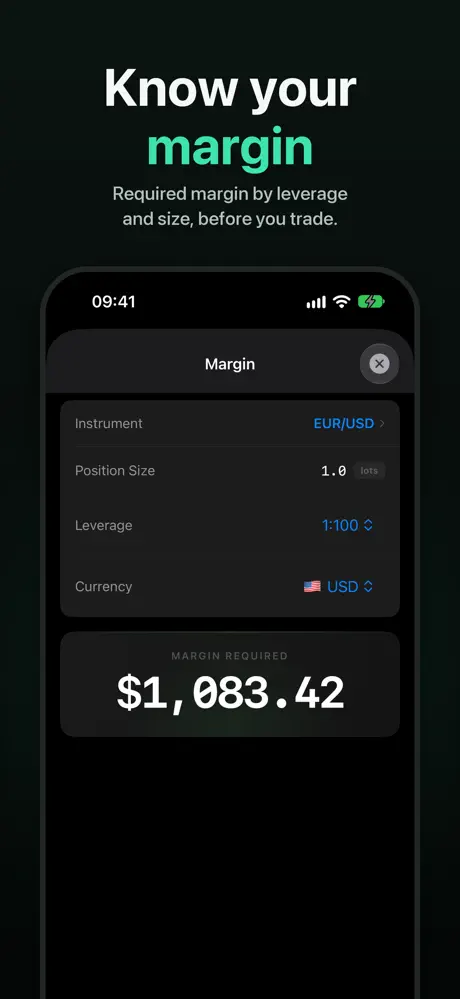
Margin required, profit and loss before you enter, pip value, drawdown after consecutive losses, the risk/reward ratio with visual bars, pivot points (Standard, Fibonacci and Camarilla) and Fibonacci retracement levels from any high and low. It also has a clock for the Sydney, Tokyo, London and New York sessions.
Do I need an account, and where is my data stored?
No account is needed. Your calculations and account profiles stay on your device.
Which languages does TradeCalc support?
8 languages: English, French, German, Spanish, Portuguese, Japanese, Traditional Chinese and Simplified Chinese. Numbers, amounts and dates follow your language and region, and account currencies include JPY, TWD and CNY.